
Lately I’ve been obsessed with static analysis. The ability to discover bugs in code without any effort is tempting — and it actually works. On the PHPStan blog I wrote about the options for static analysis in PHP today, and which tools anyone can start using right away. And of course I mentioned PHPStan too.
On the PHPStan blog I’ve written at length about what I’ve been working on for several years now, the last year of it intensively – a tool for static analysis of PHP code. PHPStan finds bugs without needing to run the code in question, which brings it closer to the compilers of statically typed languages. It makes use of the information available when parsing PHP code - typehints, documentation comments and reflection.
Various development versions of PHPStan have been guarding the production code at Slevomat for over a year now, and many times it has caught a bug on the CI server in time that would otherwise have made it into production. Developers at Hele.cz, DámeJídlo.cz and Bonami speak highly of it too.
Compared to similar tools, what it offers above all is speed, extensibility[1] and various levels of strictness, so that it doesn’t overwhelm you with an excessive number of bugs on the first run, but only the most fundamental ones, letting you start using it right away.
You’ll find a longer and more detailed discussion of it on the PHPStan blog, or just take a look at the documentation on how to set it up on your own project. In case you’d like help with the integration and configuration, definitely get in touch.
To describe the magical behavior of classes that dynamically define properties and methods through the implementation of the magic methods
__get,__setand__call. ↩︎
In the software development industry there are plenty of best practices that speed up and simplify a programmer’s work. Much has already been written about clean and readable code, SOLID principles and testing, and I think that whoever wants to has been doing all of that for a long time now. Lately, though, I have been thinking about something that is no less important and fundamental to how a team of developers and their projects function, but which I still don’t encounter very often in practice – whereas I do see the consequences of its absence.
A number of articles and talks discourage a complete rewrite of working software, and they have solid reasons for it. The need to catch up on years of work on the current version, zero value for the user, and the uncertainty that all that effort will turn out any better. A complete rewrite never makes sense. In the context of this article, though, I consider it merely one extreme on a long scale of different solutions, and I want to show that the lessons that follow from it can be applied to everyday work too, even when you are not rewriting something from scratch and seemingly doing everything right.
What reason do teams have for a complete rewrite? They need to do something differently than it is in the current project; often they just want to try it out. Nobody, not even the greatest expert, often knows whether the direction the development is heading in is the right one. That is why we should try to find out as soon as possible, to get feedback as quickly as possible. The crux of the problem lies above all in the fact that a rewrite takes too long, and for whole months or years teams build something that nobody has any idea whether it is right and whether it will pay off. This problem, however, doesn’t concern only complete rewrites, but ordinary iterative development as well.
The feedback loop is the cornerstone of any creative work. You should always focus on getting feedback on your creation as soon as possible. From colleagues, from the hardware, from users and customers. That is the only way to make sure you are building something that is worthwhile.
It is very easy to tell from the outside that someone isn’t managing this. From recent memory, one example that comes to mind is ČEZ and its new customer system:
The energy company ČEZ is switching to a new customer system. Because of the change, however, it is not possible to make any change to customer contracts until mid-October. Some customers will receive their annual statement late.
For a whole month (!) one of the largest Czech companies cannot touch its customers’ data. And that is because they did not collect feedback on the new product continuously, but deployed it all at once and found out too late that it doesn’t work.
Faster collection of feedback can be achieved with more frequent releases. But that is not the only metric a team should strive for. It is crucial to keep the amount of new code that is not in production at an absolute minimum. Code that is not deployed is a risk.
The more frequently you deploy, the smaller the changes you get into production in a single batch. Small changes come with a number of advantages. It is easier to do an honest and detailed code review. You have a greater chance of uncovering problems in the code if you are reviewing tens of lines rather than thousands.
10 lines of code = 10 issues. \ 500 lines of code = „looks fine.“ \ twitter.com/iamdevloper
The smaller the change, the smaller the risk that something breaks. Small changes are easy to revert. Short branches in Git are also far easier to manage, rebase and merge.
Concentrating on getting feedback quickly requires a change of mindset. For every change you make, you have to think about how to make it so that it can be deployed immediately without any problem.
When developing new functionality, you typically face a lot of „preparatory“ work on which you then build the new functionality. Such refactorings shouldn’t break anything and should be deployable right away. That way you verify that they work and fix any errors, of which there certainly won’t be as many as if you deployed them only in one big final bundle of changes with the whole functionality finished. It is certainly more advantageous to fix two errors 15 times over the course of several weeks than thirty errors all at once.
Besides collecting feedback on your changes in production, the colleagues with whom you share your fresh code will thank you too – they can benefit from it right away in their own task, or easily help you with yours.
Despite its advantages, however, this approach is also in some ways more demanding. Tasks need to be broken down into small parts. These parts may at first seem almost ridiculously small to you, but that means you are going about it the right way. Just as an application’s object model should consist of many simple small objects, so too should development consist of many small changes, where each one makes sense both in isolation and together with the others.
Breaking a task down into phases means you also need to think through how the application looks in the intermediate states. You will develop a feel for which requirements relate to one another, which parts of the task are essential and which are secondary. If, for example, you are redesigning part of the application and at the same time implementing new features in it, take the opportunity to split this big project into two smaller ones – first implement and deploy the redesign with the current features, and only then add the new features to it. This approach to work requires a certain amount of extra overhead, but in return you reduce the risks associated with deploying new versions of the application to a minimum. And progress is visible from the outside. You won’t be afraid to deploy a small change even on a Friday afternoon. And once you learn this, your development will consist solely of these small, safe changes.
The more s/w projects I see, the more I am getting convinced that most code quality guidelines have zero impact compared to feedback loops \ twitter.com/pembleton
If you are working on functionality that is not yet supposed to be visible, you turn branches in the version control system into branches in the code, so-called feature toggles. You deploy the work-in-progress to production, but make it accessible only to a certain user role or under a special URL. In the same way you can also run A/B tests or a gradual roll out. You should keep the number of feature toggles to the necessary minimum as well, and as soon as the new feature is accessible to everyone, you should simplify the application code again and remove the feature toggle.
If you are working on something completely new, you should verify the product’s usefulness as soon as possible. It is therefore nonsense to start development with a registration and login form, which is always the same, but you should always start with what is the core of the given product, what represents its value. If the first version delivers value to you, you can start improving it.
It pleases me when I see these principles applied outside software development too. Are you writing an article and it has no end? Split it into several parts and release them one by one. Are you writing a book? Release it to readers chapter by chapter. Does it sound crazy? For some it is already common practice.
Further reading: Why Continuous Deployment?, Code spiral. I also recommend following Michiel Rook, the developer of Phing, who often writes and links about the topic.
Every now and then a debate flares up about it. Some defend advertising as the only possible livelihood for website operators, others point to ad overload, its tastelessness, intrusiveness and generally diminished comfort as reasons for blocking it. Why I see nothing wrong with the second camp’s point of view (and count myself among them) I’ll explain in the following paragraphs.
I’ll begin with a gentle introduction to how today’s web works. Servers (someone’s computers) expose freely available content on some port and some address. Anyone can ask for that content with an HTTP request. In most cases, text in HTML format is downloaded, and it’s up to the client what it does with that text. It can display it in its pure form, render it as ASCII art in a text console, have it read aloud by a screen reader for the blind – the possibilities are countless. One of them is to hand the HTML code to the rendering engine of a modern web browser. Even there I have a range of options for how to interpret the downloaded code – I can disable or enable JavaScript execution, not download images, not run Flash, tell the server that I’m on a slow connection or that I have a low battery.
There’s a lot of talk these days about machine learning. Imagine a browser that, based on the movement of the user’s eyes, would learn and on repeat visits to a site present the user with only those parts of the page they paid attention to in the past. So that irrelevant blocks of headlines, text and graphics wouldn’t distract them from what actually interests them. An enticing idea that, if executed well, a lot of users might be interested in.
Except that we already have something like that today, and it’s causing an enormous stir. Ad blockers maintain lists of elements on pages that bother most users, and automatically remove them during rendering. Why does this bother website operators? After all, they gave me content to download that can be interpreted in various ways, and I picked one of them.
The thing is, in their business model the operators rely on my browser interpreting the code I download from them in the way that earns them money. But that’s outdated thinking that will work worse and worse. How do we get out of it?
There are efforts to prevent ad blocking, but if you read the previous paragraphs carefully, you already know that it’s fundamentally impossible. Yes, both sides can react to each other’s moves and adapt to them, but it will always be a game of cat and mouse, and the blocking side will generally always have the upper hand, because the principles of web technologies favor it. Just as I can switch the channel while watching television, or skip the page with paid ads while reading the newspaper, on the web I will always have the option to avoid ads. Nobody bats an eye anymore at the pop-up blocking built right into the browser.
So this is not the way forward in the long run. Website operators have to realize why users feel the need to block ads – because they’re intrusive, aggressive, tasteless, and eat up far more data, processor time and battery[1]. As long as I have to close, with the little X, an animated and noisy ad for a mobile carrier when I enter a news portal – an ad that’s eating precious megabytes out of my data cap – I’m simply going to block it. So advertisers, ad networks and operators should first and foremost fix advertising’s reputation – serve it in such quantity and quality that people don’t flee from it and don’t ignore it.
Even though I don’t look at and don’t click on ads on content sites, I don’t feel like a freeloader. I believe I’m useful to the website operator anyway. I give them my time, read their articles, think about the topics in question, and if they grab me, I share them onward.
From the previous paragraphs it might seem that I’m in favor of abolishing the field of marketing, but that’s not the case. Marketing is a creative field, and it’s up to the creatives to get content to me at the right moment that will be useful to me and interest me. I’m a proponent of native advertising. If the form of the ad is combined with the right targeting, I have nothing against it. So if my favorite tech podcast mentions a quality domain registrar or a VPS host, it’s a bullseye for me.[2]
Further reading: The ethics of modern web ad-blocking
Nothing compares to the snappiness of websites with a blocker enabled, especially on mobile devices. iOS 9 came to 64-bit devices with support for so-called content blockers, which brings unexpected support for ad blocking to Apple’s closed ecosystem. I recommend everyone install one. ↩︎
Based on ads in podcasts, I’ve bought at least four products by now. Who can say that about banners on Czech websites? ↩︎
While building Slevomat’s new shopping cart, we faced a number of challenges. One of them stemmed from the fact that the entire cart was presented on a single page, and new steps extended the page further down. The benefit for the user is that on later steps they don’t have to go looking for what’s actually in their cart – they just look at the top of the page.

The whole cart is built as an SPA[1]. Even though we had wireframes proposing the layout of the individual cart steps, a static design that looks good on its own doesn’t give you a complete picture of how the application behaves. I had to figure out how to handle the transition between the individual cart steps so that the user would immediately get their bearings and have a sense of where they are.
The moment the user expresses their intent (continuing to the next step of the cart, or going back) the application shouldn’t put any obstacles or additional „tasks“ in their way before they can continue doing what they want. In the case of our cart, automatic scrolling is the obvious choice, so that after the user clicks „Continue“ they can go straight to picking a payment method without having to reach for the mouse wheel.
The first naive implementation always moved the page so that the top edge of the current cart step was aligned with the top edge of the viewport:
$('html, body').animate({
	scrollTop: $target.offset().top
}, 500);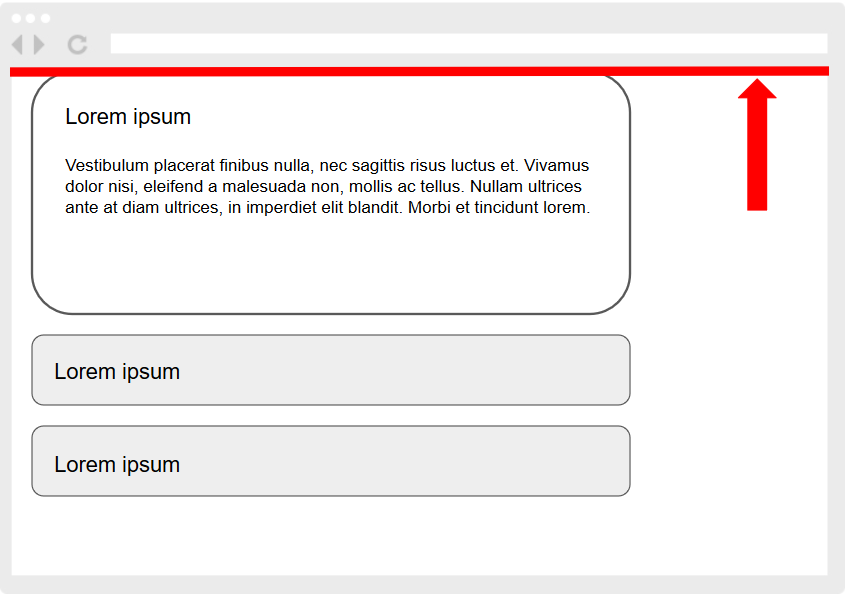
The page moved every single time and sometimes traveled an unnecessarily long distance, which was unpleasant on the eyes. I realized that the goal isn’t actually for the current step to always appear at the top of the viewport, but merely for it to be fully visible – anywhere on the screen.
The first optimization was that if the current step is already entirely within the viewport, I don’t need to scroll at all. For that I need the viewport height and the element’s position relative to it. No scrolling is the best scrolling!
var viewportHeight = Math.max(document.documentElement.clientHeight, window.innerHeight || 0);
var isWholeElementVisible = $element[0].getBoundingClientRect().top >= 0 &&
	$element[0].getBoundingClientRect().bottom <= viewportHeight;
if (isWholeElementVisible) {
	return;
}
If this condition wasn’t met, I again fell back to the naive scroll to the top edge. But that led to the same unnecessary and overly large movements as before this optimization. It occurred to me that I could somehow work with the element’s bottom edge and align it to the bottom edge of the viewport:
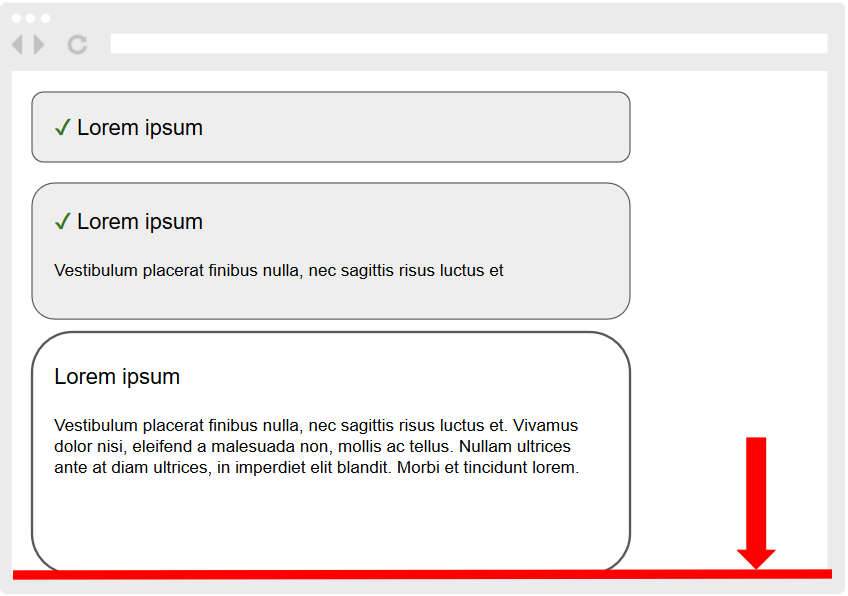
But in which case? I can’t scroll this way every time, because while it would work more or less for transitioning to subsequent steps, going back to previous ones would once again cause a larger page movement than is actually needed. And that’s the real key – I compare the distance the page has to travel to align the element’s top edge with the viewport’s top edge against the distance to align the element’s bottom edge with the viewport’s bottom edge, and I scroll to whichever is closer!
I also have to exclude from bottom-edge scrolling those elements that are taller than the entire viewport, because the user shouldn’t lose the beginning of the step, which may contain its title, explanatory notes, or even part of a form they have to fill in.
var currentScrollPosition = window.scrollY;
var scrollingOffsetTop = $element.offset().top;
var offsetToScrollTo = scrollingOffsetTop;
var fitsInViewPort = $element.height() < viewportHeight;
if (fitsInViewPort) {
	var scrollingDistanceToTop = Math.abs(currentScrollPosition - scrollingOffsetTop);
	var scrollingOffsetBottom = scrollingOffsetTop + $element.outerHeight() - viewportHeight;
	var scrollingDistanceToBottom = Math.abs(currentScrollPosition - scrollingOffsetBottom);
	if (scrollingDistanceToBottom < scrollingDistanceToTop) {
		offsetToScrollTo = scrollingOffsetBottom;
	}
}

$('html, body').animate({
	scrollTop: offsetToScrollTo
}, 500);
I quite liked this solution already. The last detail I tweaked was the animation duration. For larger distances the scroll happened too fast, and the resulting effect was again unpleasant. So I set up the animation such that if the page travels more than 60% of the viewport during the scroll, I extend the default duration by 30%:
var duration = 500;
var scrollingDistance = Math.abs(currentScrollPosition - offsetToScrollTo);
if (scrollingDistance / viewportHeight > 0.6) {
	duration *= 1.3;
}
$('html, body').animate({
	scrollTop: offsetToScrollTo
}, duration);
My take is that you always need to think about the scroll position and not settle for the naive solution in the first example. I believe the approach described here will find use beyond single-page carts.
Personally I feel most at home programming the backend, but I enjoy occasionally jumping over to the frontend too and solving an interesting problem – doing math with coordinates on a display is a completely different league than writing SQL queries and filling templates[2]. Last week, for example, I spent some time[3] tuning the motion of a vinyl record so that it smoothly stops and starts depending on the user’s cursor.
Single-page application – after the initial load, all of the user’s interaction and communication with the server happens via AJAX and the page isn’t reloaded, which leads to faster work with the application and improved user comfort. ↩︎
Of course, backend work isn’t only about this, but with client-side applications I feel somehow closer to people 😉 ↩︎
More than I’m willing to admit. ↩︎
I don’t like branchy code. More branches (if/elseif/else) mean more combinations to test, more complicated and more fragile code. Long chains of ifs can be removed using polymorphism — that’s a well-known and, I believe, sufficiently established technique.
Today, though, I want to show a way to get rid of ifs if you meet these two prerequisites:
- Your code is asynchronous.
- You’re waiting for something.
You commonly run into asynchronous code in the JavaScript world – in the browser as well as on the server in node.js. PHP can be asynchronous too if you use ReactPHP. What all of these implementations have in common is that the application’s run is driven by an event loop. Blocking operations such as making HTTP requests, querying a database, reading from disk and so on become non-blocking in an asynchronous environment. That means that while waiting for their result (a response from a remote server, the result of a query, the contents of a file) you can run other code, so the application’s process is never bored and you make more efficient use of system resources.
You meet the second condition if your code contains conditions in the style of:
- „Has that query finished yet?“
- „Did the connection succeed, or are we still waiting?“
- „Have X seconds elapsed?“
The goal is to adjust the code so that it works whether the given matter has or hasn’t been fulfilled yet, without having to branch the code before/after it is fulfilled.
Take the following example: a process has to do some work and at the same time stay alive for at least 5 seconds so that Supervisor considers its startup successful. With ordinary synchronous code we would do it like this:
$startTime = microtime(true);

// doing work...

$stayAliveSeconds = 5;
$uptime = microtime(true) - $startTime;
if ($uptime < $stayAliveSeconds) {
	usleep(round(($stayAliveSeconds - $uptime) * 1000000));
}

exit(0);
An ugly if that forces us to run the given method at least twice when testing.
Thanks to the fact that our RabbitMQ queue consumers run under the Bunny library, and therefore within ReactPHP’s event loop, we can use promises instead of the solution above.
A promise is an object that can be in one of three states: pending, resolved and rejected. While pending it is waiting for a result, when resolved it has already obtained it, and rejected represents a failure. Parties interested in the result attach themselves to a promise using the then() method. Alongside the promise there also lives a deferred object, which serves as the controller of its promise. It determines when its promise will be fulfilled. To preserve encapsulation you should expose only the promise object, never the deferred.
What helps you get rid of ifs in the code is precisely the behavior of the then() method. When you call it, it doesn’t matter what state the promise is currently in. If it isn’t fulfilled yet, the passed callback will be called later; otherwise immediately.
The usleep() example can be rewritten like this:
$stayAliveDeferred = new \React\Promise\Deferred();
$this->loop->addTimer(5, function () use ($stayAliveDeferred) {
	$stayAliveDeferred->resolve();
});
$stayAlivePromise = $stayAliveDeferred->promise();

// doing work...

$stayAlivePromise->then(function () {
	exit(0);
});
If you refactor the first part into a separate PromiseTimer class, because this logic repeats often in the code, then the code is reduced to something more pleasant:
$stayAlivePromise = (new \PromiseTimer($this->loop))->wait(5);

// doing work...

$stayAlivePromise->then(function () {
	exit(0);
});
I got rid not only of any ifs, but also of all the arithmetic with milliseconds.
The same trick can be used on the frontend when fetching data over AJAX. If several components are interested in the same data at the same time, but you only want to request it from the server once one of them asks for it, you suddenly find yourself fighting these states in your code: nobody has asked for the data yet, the data is currently being downloaded from the server, we already have the data. To avoid duplicate requests to the server and other bugs that may show up, for example, the moment a fast-clicking user on a slow connection comes along, you can write a set of confusing and hard-to-test ifs, or use promises. All the code that is interested in the data asks for it using then() – so it won’t assume the data is already downloaded, but if it is, the passed callback is called immediately:
getProducts().then(function (products) {
	// ...
});Phil Sturgeon, completely rationally, objectively and with healthy detachment, on the recent controversies around the Code of Conduct in PHP, political correctness and equality in IT:
So, instead of freaking out about problems you don’t understand, assuming everyone is just being overly sensitive, being absolutely awful to under-represented groups when they point out reasons they feel uncomfortable in the tech community, then having the gall to suggest there are far fewer of these people in the tech community because they aren’t as interested in tech… maybe take a few steps back and think about that whole situation.
Personally, I’ve never felt the need for a Code of Conduct in the communities I move in, but it would also never in any way occur to me to mock the expressions of those who call for a CoC. I’m not in their shoes, and I respect that they have that need. And the hateful and trolling behavior of those who rail against a CoC probably really does prove that we need it.