
Perfect scrolling to exactly where the user needs it
While building Slevomat’s new shopping cart, we faced a number of challenges. One of them stemmed from the fact that the entire cart was presented on a single page, and new steps extended the page further down. The benefit for the user is that on later steps they don’t have to go looking for what’s actually in their cart – they just look at the top of the page.
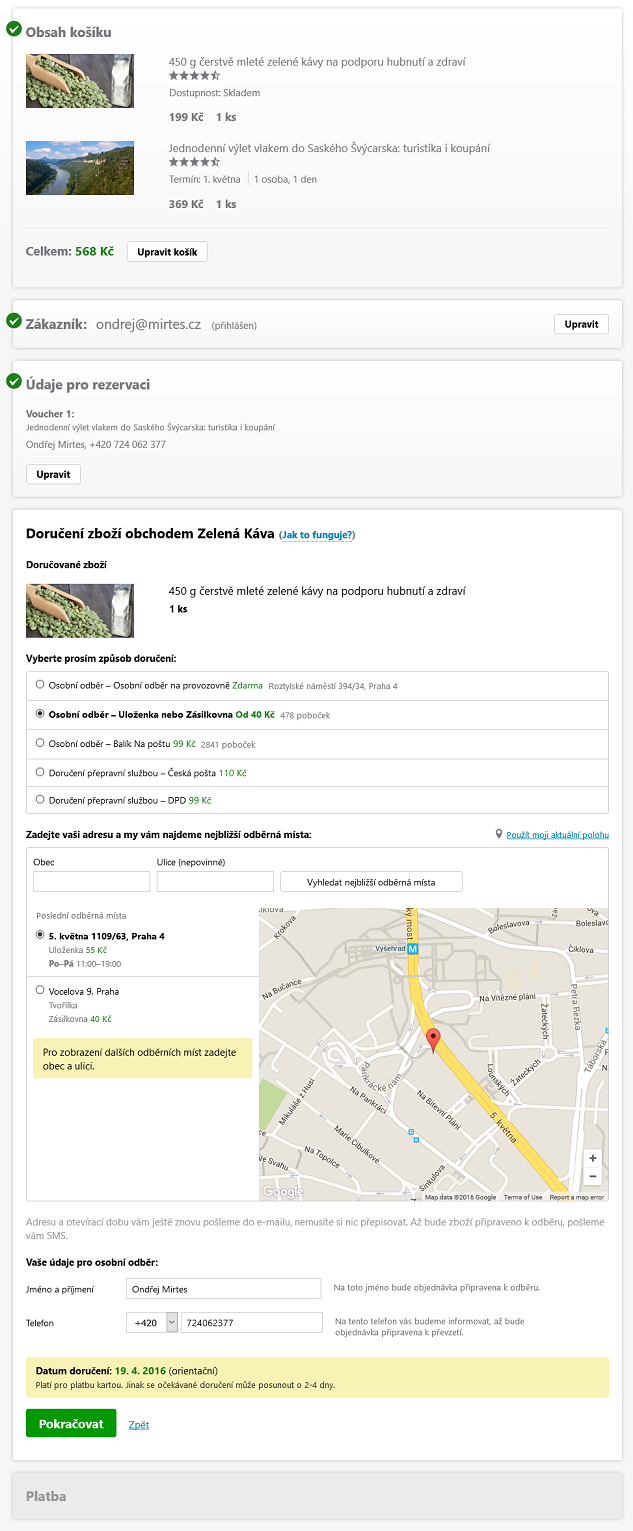
The whole cart is built as an SPA[1]. Even though we had wireframes proposing the layout of the individual cart steps, a static design that looks good on its own doesn’t give you a complete picture of how the application behaves. I had to figure out how to handle the transition between the individual cart steps so that the user would immediately get their bearings and have a sense of where they are.
The moment the user expresses their intent (continuing to the next step of the cart, or going back) the application shouldn’t put any obstacles or additional „tasks“ in their way before they can continue doing what they want. In the case of our cart, automatic scrolling is the obvious choice, so that after the user clicks „Continue“ they can go straight to picking a payment method without having to reach for the mouse wheel.
The first naive implementation always moved the page so that the top edge of the current cart step was aligned with the top edge of the viewport:
$('html, body').animate({
	scrollTop: $target.offset().top
}, 500);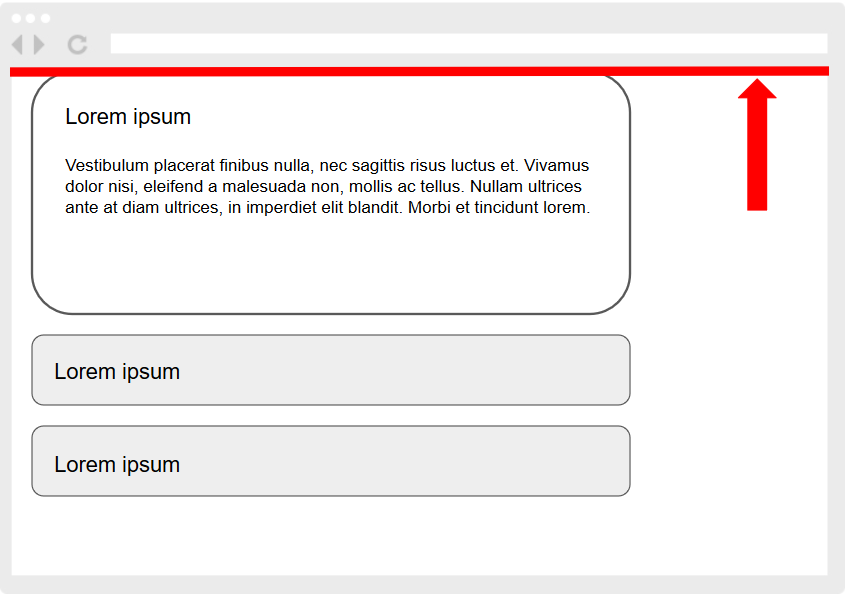
The page moved every single time and sometimes traveled an unnecessarily long distance, which was unpleasant on the eyes. I realized that the goal isn’t actually for the current step to always appear at the top of the viewport, but merely for it to be fully visible – anywhere on the screen.
The first optimization was that if the current step is already entirely within the viewport, I don’t need to scroll at all. For that I need the viewport height and the element’s position relative to it. No scrolling is the best scrolling!
var viewportHeight = Math.max(document.documentElement.clientHeight, window.innerHeight || 0);
var isWholeElementVisible = $element[0].getBoundingClientRect().top >= 0 &&
	$element[0].getBoundingClientRect().bottom <= viewportHeight;
if (isWholeElementVisible) {
	return;
}
If this condition wasn’t met, I again fell back to the naive scroll to the top edge. But that led to the same unnecessary and overly large movements as before this optimization. It occurred to me that I could somehow work with the element’s bottom edge and align it to the bottom edge of the viewport:
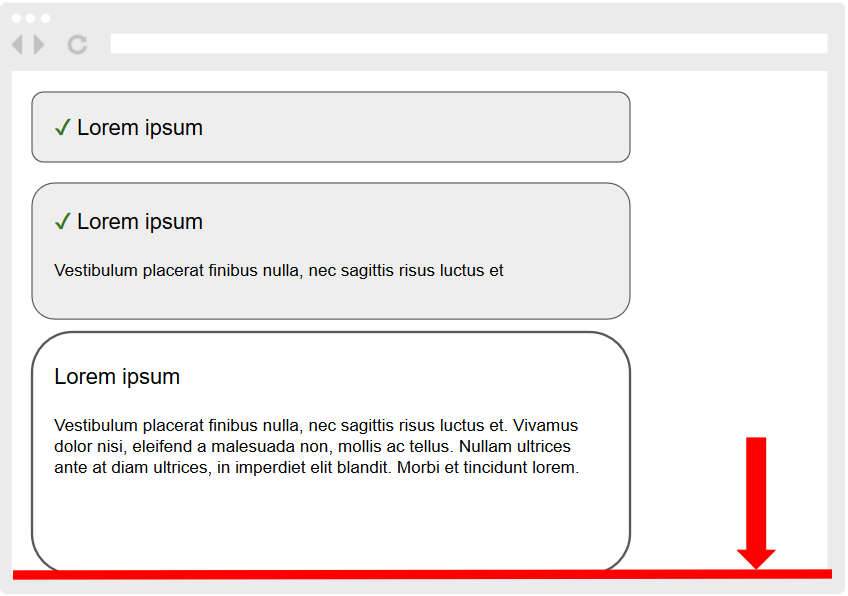
But in which case? I can’t scroll this way every time, because while it would work more or less for transitioning to subsequent steps, going back to previous ones would once again cause a larger page movement than is actually needed. And that’s the real key – I compare the distance the page has to travel to align the element’s top edge with the viewport’s top edge against the distance to align the element’s bottom edge with the viewport’s bottom edge, and I scroll to whichever is closer!
I also have to exclude from bottom-edge scrolling those elements that are taller than the entire viewport, because the user shouldn’t lose the beginning of the step, which may contain its title, explanatory notes, or even part of a form they have to fill in.
var currentScrollPosition = window.scrollY;
var scrollingOffsetTop = $element.offset().top;
var offsetToScrollTo = scrollingOffsetTop;
var fitsInViewPort = $element.height() < viewportHeight;
if (fitsInViewPort) {
	var scrollingDistanceToTop = Math.abs(currentScrollPosition - scrollingOffsetTop);
	var scrollingOffsetBottom = scrollingOffsetTop + $element.outerHeight() - viewportHeight;
	var scrollingDistanceToBottom = Math.abs(currentScrollPosition - scrollingOffsetBottom);
	if (scrollingDistanceToBottom < scrollingDistanceToTop) {
		offsetToScrollTo = scrollingOffsetBottom;
	}
}

$('html, body').animate({
	scrollTop: offsetToScrollTo
}, 500);
I quite liked this solution already. The last detail I tweaked was the animation duration. For larger distances the scroll happened too fast, and the resulting effect was again unpleasant. So I set up the animation such that if the page travels more than 60% of the viewport during the scroll, I extend the default duration by 30%:
var duration = 500;
var scrollingDistance = Math.abs(currentScrollPosition - offsetToScrollTo);
if (scrollingDistance / viewportHeight > 0.6) {
	duration *= 1.3;
}
$('html, body').animate({
	scrollTop: offsetToScrollTo
}, duration);
My take is that you always need to think about the scroll position and not settle for the naive solution in the first example. I believe the approach described here will find use beyond single-page carts.
Personally I feel most at home programming the backend, but I enjoy occasionally jumping over to the frontend too and solving an interesting problem – doing math with coordinates on a display is a completely different league than writing SQL queries and filling templates[2]. Last week, for example, I spent some time[3] tuning the motion of a vinyl record so that it smoothly stops and starts depending on the user’s cursor.
Single-page application – after the initial load, all of the user’s interaction and communication with the server happens via AJAX and the page isn’t reloaded, which leads to faster work with the application and improved user comfort. ↩︎
Of course, backend work isn’t only about this, but with client-side applications I feel somehow closer to people 😉 ↩︎
More than I’m willing to admit. ↩︎